
What is a G Code
2025-08-25
What is a G Code? The Language That Powers CNC Programming
In the world of manufacturing, CNC programming stands as the backbone of automated production—turning 3D designs into physical parts with unmatched precision. But behind every successful CNC program lies a fundamental building block: G code. Think of CNC programming as a chef’s recipe, and G code as the specific instructions that tell the chef (the CNC machine) exactly how to chop, sauté, or bake. Without G code, CNC programming would be nothing more than a set of vague ideas, unable to translate design intent into actionable machine movements.
G code is the universal “language” of CNC machines, and mastering it is non-negotiable for anyone working in CNC programming. Whether you’re writing a simple program to drill a hole or a complex one to carve a turbine blade, G code dictates every critical action—from how fast the tool moves to where it positions itself. In this blog, we’ll unpack what a G code is, its symbiotic relationship with CNC programming, key characteristics that make it essential, common G codes every programmer needs to know, and how it integrates with modern software. By the end, you’ll understand why G code isn’t just a part of CNC programming—it’s the foundation that makes it work.
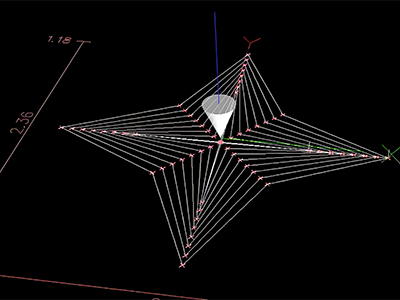
The Symbiotic Relationship Between CNC Programming and G Code
Before diving into the details of G code, it’s critical to grasp how it and CNC programming rely on each other. CNC programming is the process of creating a set of instructions to control CNC machines, but those instructions are written in G code (and complementary codes like M code). In short: CNC programming is the “process,” and G code is the “language” that process uses to communicate.
Imagine you’re a CNC programmer tasked with creating a program for a 3-axis mill to cut a rectangular bracket. First, you’d use CAD software to design the bracket, then CAM software to define toolpaths, cutting speeds, and feed rates. But the final step of CNC programming is generating a G code file—this file is what you load into the CNC machine. Without G code, the machine can’t interpret the CAM software’s settings; it would have no idea where to move the tool, how deep to cut, or when to stop.
Conversely, G code can’t function without CNC programming. A G code by itself is just a line of text (e.g., “G01 X5 Y10 F200”); it needs the context of a full CNC program to make sense. The CNC programmer decides which G codes to use, in what order, and how to pair them with other parameters (like spindle speed or coolant settings) to achieve the desired part. This symbiosis means that proficiency in CNC programming directly depends on understanding G code—and vice versa.
Defining G Code: What It Is and What It Does
At its core, G code (short for “preparatory code”) is a standardized set of numerical and alphabetical commands that control the movement and cutting actions of CNC machines. Developed under the ISO 6983 standard, G code ensures consistency across most CNC equipment—whether you’re using a Haas mill, a Mazak lathe, or a Fanuc router. This standardization is a game-changer for CNC programming, as it lets programmers write G code for one machine and adapt it to another with minimal tweaks.
G code’s primary role in CNC programming is to answer three key questions for the machine:
- Where to move? G codes define coordinates (X, Y, Z axes, and more for multi-axis machines) to tell the tool where to go.
- How to move? They specify the type of motion—whether it’s a rapid, non-cutting move (G00) or a slow, precise cutting move (G01).
- What to do when moving? G codes can activate or deactivate features like tool length compensation (G43) or work offsets (G54), which ensure accuracy in CNC programming.
Unlike M codes (which control non-cutting functions like spindle on/off or coolant), G codes are all about the tool’s interaction with the workpiece. For example, in a CNC program for drilling a hole, the G code “G01 Z-10 F150” tells the machine: “Move the tool straight down (Z-axis) 10 units at a feed rate of 150 units per minute—this is a cutting move.” Without this G code, the CNC program couldn’t execute the actual drilling action.
It’s important to note that G code is “modal,” meaning once you activate a G code (e.g., G01 for linear interpolation), it stays active until you replace it with another relevant G code (e.g., G00 for rapid positioning). This modality streamlines CNC programming, as programmers don’t need to repeat the same G code for every move—they only need to update it when the motion type changes.
Key Characteristics of G Code That Shape CNC Programming
G code isn’t just a random set of commands—it has specific traits that make it indispensable for CNC programming. Understanding these characteristics helps programmers write more efficient, error-free CNC programs and troubleshoot issues when they arise.
Standardization: The Universal Grammar of CNC Programming
The ISO 6983 standard is the backbone of G code, and it’s one of the biggest reasons G code works so well in CNC programming. This standard defines what each G code does—for example, G00 always means “rapid positioning,” G01 always means “linear interpolation,” and G54 always refers to the first workpiece coordinate system.
This standardization eliminates confusion in CNC programming. A programmer who learns G code on a Fanuc machine can easily transition to a Siemens machine because the core G codes behave the same way. It also simplifies training: new CNC programmers don’t have to learn a unique language for every machine—they just need to master the standardized G code set, plus any machine-specific nuances (like rare M codes).
Modality: Streamlining CNC Program Efficiency
As mentioned earlier, G code is modal, which is a critical feature for efficient CNC programming. Let’s say you’re writing a CNC program to cut three straight sides of a square. Instead of writing “G01 X10 Y0 F200,” then “G01 X10 Y10 F200,” then “G01 X0 Y10 F200,” you can write:
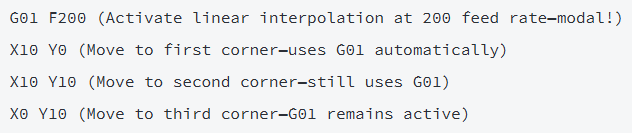
This reduces the length of the CNC program, minimizes typos, and makes the code easier to read. Modality also helps with troubleshooting: if a machine is making unexpected linear moves, the programmer can quickly check which G code is currently active (it’s likely G01, not G00).
Compatibility with Multi-Axis CNC Programming
Modern CNC machines (like 5-axis mills) can move tools along five or more axes, enabling complex 3D cuts. G code is designed to handle this complexity, making it essential for advanced CNC programming. For example:
- G02/G03: These G codes control circular interpolation (clockwise and counterclockwise, respectively) and work on 2D planes—but they can also be paired with other G codes (like G17, G18, G19) to specify which plane (XY, XZ, YZ) the circle is on.
- G05.1 Q1: This G code activates “high-speed machining” mode, which optimizes toolpaths for 5-axis machines—critical for CNC programming tasks like carving aerospace components.
Without G code’s support for multi-axis motion, CNC programming for complex parts (like turbine blades or dental implants) would be nearly impossible. G code adapts to the machine’s capabilities, letting programmers push the limits of what CNC machining can achieve.
Common G Codes Every CNC Programmer Needs to Master
While there are over 100 G codes (some machine-specific), most CNC programming tasks rely on a small set of core G codes. Mastering these will let you handle 80% of everyday CNC programming jobs—from simple milling to basic turning.
G00: Rapid Positioning (Non-Cutting Move)
G00 is one of the most frequently used G codes in CNC programming. It tells the CNC machine to move the tool as fast as possible to a new position—with no cutting. CNC programmers use G00 to position the tool before a cutting move (e.g., moving from the machine’s “home” position to the workpiece) or after a cut (e.g., retracting the tool to a safe height).
Example in CNC programming:

Important note: G00 is for non-cutting only—never use it when the tool is touching the workpiece, as it can damage the part or tool.
G01: Linear Interpolation (Cutting Move)
G01 is the workhorse of CNC programming for cutting. It controls straight-line movement at a specified feed rate (F value), making it ideal for tasks like milling flat surfaces, drilling straight holes, or cutting rectangular shapes.
Example in CNC programming:

The feed rate (F) is critical here: CNC programmers adjust it based on the material (e.g., slower for steel, faster for aluminum) to prevent tool wear and ensure a smooth finish.
G02/G03: Circular Interpolation (Curved Cuts)
For curved cuts (like arcs or circles), CNC programmers use G02 (clockwise) and G03 (counterclockwise). These G codes require additional parameters: the end position of the tool, the radius of the arc (R) or the incremental distance from the start point to the arc’s center (I, J, K), and the plane (G17 for XY, G18 for XZ, G19 for YZ).
Example in CNC programming (cutting a clockwise arc in the XY plane):

G02/G03 are essential for CNC programming tasks like making rounded edges on parts or cutting circular holes larger than the tool diameter.
G54–G59: Workpiece Coordinate Systems
Every CNC program needs to know where the workpiece is located relative to the machine’s “home” position (0,0,0). G54–G59 are G codes that define work offsets—they tell the machine, “This is where the part starts.” CNC programmers use these G codes to set up multiple workpieces on the same machine (e.g., G54 for Part A, G55 for Part B) without re-calibrating the machine.
Example in CNC programming:

Setting up work offsets correctly is one of the most important steps in CNC programming—if G54 is set wrong, the tool may cut outside the part, ruining it.
G43: Tool Length Compensation
CNC machines use tools of different lengths (e.g., a 50mm drill bit vs. a 100mm end mill). G43 is a G code that “compensates” for these length differences, ensuring the tool cuts to the correct depth. CNC programmers pair G43 with an H value (which references a tool length offset stored in the machine’s memory).
Example in CNC programming:

Without G43, CNC programming would require manual calculations for every tool change—an error-prone process that wastes time.
How G Code Integrates with CAM Software in Modern CNC Programming
In the early days of CNC programming, programmers wrote G code manually—line by line—for every part. This worked for simple tasks (like drilling a few holes) but was impractical for complex parts (like 3D aerospace components). Today, most CNC programming relies on CAM (Computer-Aided Manufacturing) software, which automates G code generation—but G code remains the bridge between CAM and the CNC machine.
Here’s how the process works:
- Design the Part in CAD: The programmer (or designer) creates a 3D model of the part in CAD software (e.g., SolidWorks, Autodesk Fusion 360).
- Set Up CAM Parameters: The CNC programmer imports the CAD model into CAM software (e.g., Mastercam, Fusion 360) and defines critical settings:
-
- Tool selection (e.g., end mill, drill bit).
-
- Cutting strategy (e.g., contouring, pocketing).
-
- Feed rates, spindle speeds, and tolerances.
- Generate G Code: The CAM software uses these parameters to calculate the toolpath and automatically write the G code. For example, if the programmer selects a “pocketing” strategy (to cut a hollow area in the part), the CAM software generates hundreds of G01 and G02/G03 commands to create the pocket.
- Validate and Load the G Code: The CNC programmer reviews the G code (using simulation tools to check for collisions or errors) and loads it into the CNC machine.
While CAM software automates G code generation, it doesn’t replace the need for understanding G code in CNC programming. Here’s why:
- Troubleshooting: If the part comes out wrong (e.g., too shallow a cut), the programmer needs to read the G code to identify the issue (e.g., a missing G43 or an incorrect Z value).
- Optimization: CAM software generates “good” G code, but skilled CNC programmers can tweak it to be better—for example, adjusting G01 feed rates to reduce tool wear or removing unnecessary G00 moves to save time.
- Machine-Specific Tweaks: Some CNC machines have unique requirements (e.g., a special G code for high-speed mode). CAM software may not account for these, so programmers need to edit the G code manually to add them.
Frequently Asked Questions (FAQ) About G Code and CNC Programming
Is G code the only language used in CNC programming?
No—G code works alongside other codes to create complete CNC programs. The most common companion is M code (miscellaneous code), which controls non-cutting functions like spindle on/off (M03/M05), coolant on/off (M08/M09), and program end (M30). Some CNC programming also uses T codes (tool change, e.g., T01 for Tool 1) and S codes (spindle speed, e.g., S2000 for 2000 RPM). G code, however, is the only language that controls cutting and tool movement—the core of CNC programming.
Do I need to write G code manually for CNC programming, or can CAM software do it all?
For most complex parts, CAM software generates G code automatically—this is the standard in modern CNC programming. However, manual G code writing is still useful for:
- Simple tasks (e.g., drilling a single hole or cutting a straight line).
- Troubleshooting (editing a few lines of CAM-generated G code to fix an error).
- Machine-specific adjustments (adding a custom G code that CAM software doesn’t support).
Even with CAM software, CNC programmers need to understand G code to review and optimize the generated code.
Are G codes the same across all CNC machines?
Most core G codes (like G00, G01, G54) are standardized under ISO 6983, so they work the same way on nearly all CNC machines. However, some advanced or machine-specific G codes vary. For example:
- Fanuc machines use G05.1 Q1 for high-speed machining.
- Siemens machines use G251 for the same function.
CNC programmers solve this by using “postprocessors”—tools that convert CAM-generated G code into a format specific to the machine. Always check the machine’s manual for unique G codes before starting CNC programming.
How do I troubleshoot G code errors in CNC programming?
Common G code errors include typos (e.g., “G01 X5 Y0 F20” instead of “F200”), missing parameters (e.g., a G02 without an R or I/J value), or incorrect work offsets (e.g., using G55 instead of G54). To troubleshoot:
- Use the CNC machine’s “dry run” mode to test the G code without cutting material.
- Check the machine’s error message (it will often point to the line of G code causing the issue).
- Verify work offsets (G54–G59) and tool length compensation (G43) are set correctly.
- Compare the G code to the CAM toolpath simulation to spot discrepancies.
Will AI replace the need to learn G code for CNC programming?
AI is streamlining parts of CNC programming (e.g., generative toolpaths in Fusion 360), but it won’t replace G code knowledge anytime soon. Here’s why:
- AI generates G code based on inputs, but it can’t account for real-world variables (e.g., a batch of steel that’s harder than expected). CNC programmers need to edit G code to adjust for these variables.
- Machine-specific G codes and postprocessing still require human expertise.
- Quality control (ensuring the G code produces a part that meets standards) needs human oversight.
AI is a tool that makes CNC programming faster—but understanding G code is still essential for mastering the process.
References
- Smith, J. (2024). CNC Programming: Principles and Practice (5th Edition). McGraw-Hill Education. This textbook devotes an entire chapter to G code fundamentals, including real-world examples of how to use G01, G02/G03, and G54 in CNC programming, plus troubleshooting tips for common G code errors.
- Manufacturing Technology Insights. (2023). The Future of G Code in AI-Driven CNC Programming. Retrieved from https://www.manufacturingtechnologyinsights.com. This report analyzes how CAM software and AI are evolving G code generation, with case studies from manufacturers like Haas and Mazak on optimizing CNC programming workflows.
- International Association of Machinists and Aerospace Workers (IAMAW). (2025). G Code Standards for Modern CNC Machines: A Practical Guide. IAMAW Press. This guide breaks down ISO 6983 G code standards, explains machine-specific variations, and provides best practices for integrating G code into high-precision CNC programming (e.g., aerospace and medical device production).
Which are don'ts while using a CNC machine
What is CNC Programming
Related Article

Gears are the backbone of mechanical transmission systems, converting rotational motion and torque between shafts to power everything from household appliances to industrial machinery.
What are the 4 types of gears

CNC machines (Computer Numerical Control machines) have transformed manufacturing by delivering unmatched precision, repeatability, and efficiency across material types—from metals to plastics and composites.
Which Industries Mostly Use CNC Machines

CNC machining is celebrated for its precision and versatility in shaping metals, plastics, and composites—but its subtractive nature (removing material from a solid workpiece to create parts) raises a critical question: “Is CNC machining wasteful?” At first glance, the piles of metal shavings, plastic chips, and scrapped parts from CNC operations might suggest yes.
Is CNC machining wasteful
