
What is CNC Programming
2025-08-25
What is CNC Programming?
Modern manufacturing stands on the pillars of precision, efficiency, and scalability—qualities that have elevated CNC machining to a dominant role across industries, from aerospace engineering to medical device production. Yet, even the most advanced CNC (Computer Numerical Control) machines cannot function independently. They rely on a critical process that transforms design ideas into actionable instructions: CNC programming. Without CNC programming, CNC machines are merely static tools, unable to execute the intricate cuts, drills, and shaping needed to create complex components. In this blog, we’ll unpack the essence of CNC programming, its role in manufacturing, how it differs from traditional methods, its key components, real-world applications, and address the most pressing questions about this essential skill.
CNC Machining: The Foundation for CNC Programming
Before diving into CNC programming, it’s vital to understand the context of CNC machining. CNC machining is an automated manufacturing process where pre-programmed computer software dictates the movement of factory tools and machinery. This automation eliminates the need for manual operation, reducing human error and enabling consistent production of high-precision parts. From milling machines that carve metal blocks into engine components to lathes that shape cylindrical parts, CNC machining has revolutionized how we produce goods.
But here’s the critical link: CNC machining depends on CNC programming. Every movement of a CNC machine—whether a mill’s precise horizontal cut or a lathe’s rotational speed—is guided by code written through CNC programming. Think of CNC programming as the “translator” between a designer’s blueprint (created in CAD software) and the CNC machine’s mechanical actions. Without this translation, even the most sophisticated CNC machine cannot interpret what a part should look like or how to make it. In short, CNC programming is the brain that powers the CNC machining body.
What is CNC Programming?
At its core, CNC programming (Computer Numerical Control Programming) is the process of creating a set of coded instructions that direct CNC machines to perform specific manufacturing tasks. These instructions—written in a combination of numbers, letters, and symbols—convert 2D or 3D design files into step-by-step actions, such as cutting, drilling, boring, or grinding.
Unlike manual machining, where a skilled operator guides tools by hand (relying on muscle memory and visual inspection), CNC programming automates every step. This automation ensures two game-changing benefits:
- Consistency: Every part produced from the same CNC program is identical, even across hundreds or thousands of units.
- Precision: CNC programming can achieve tolerances as tight as ±0.001 inches (25 micrometers)—far beyond what manual machining can accomplish.
CNC programming is not just about writing code, though. It requires a deep understanding of:
- Material properties (e.g., how aluminum vs. steel reacts to cutting tools).
- Tool mechanics (e.g., which drill bit or end mill works best for a task).
- Machine capabilities (e.g., a 3-axis vs. 5-axis CNC machine’s movement limits).
- Quality standards (e.g., aerospace or medical industry requirements).
In practice, CNC programming acts as the bridge between design intent and physical production. A designer might create a 3D model of a gear in CAD software, but it’s the CNC programmer who turns that model into code that tells the CNC mill how fast to spin the tool, how deep to cut, and in which order to make each pass.

CNC Programming vs. Traditional Machining
To fully grasp the value of CNC programming, it’s helpful to compare it to traditional manual machining. For decades, manual machining was the standard: operators used hand cranks, levers, and their own judgment to shape parts. While this method worked for simple components, it had severe limitations that CNC programming solves.
Precision and Consistency
Traditional machining relies entirely on the operator’s skill. Even the most experienced operator will make small errors due to fatigue, visual misjudgment, or slight hand tremors. Over time, these errors add up, leading to inconsistent parts—some of which may be unusable.
CNC programming eliminates this variability. Once a CNC program is written and tested, the CNC machine will execute the exact same steps every time. This is critical for industries like automotive, where thousands of identical engine parts are needed, or medical device manufacturing, where a single error in a surgical tool could have life-threatening consequences.
Scalability for Complex Parts
Traditional machining struggles with complex geometries, such as curved surfaces, intricate holes, or 3D shapes. Creating a part like a turbine blade (with its twisted, aerodynamic design) manually would take weeks—and even then, it would likely fail to meet precision standards.
CNC programming, however, thrives on complexity. Using CAM (Computer-Aided Manufacturing) software, CNC programmers can generate code for 5-axis CNC machines, which move tools along five different axes simultaneously. This allows the machine to carve complex 3D shapes with ease—something traditional machining simply cannot match. For example, aerospace companies like Boeing use CNC programming to produce turbine blades that meet strict aerodynamic and structural requirements.
Efficiency and Cost Savings
Manual machining is slow, especially for high-volume production. An operator can only work so many hours a day, and each part takes time to set up and execute. CNC programming, by contrast, automates setup and execution. Once a CNC program is loaded, the machine can run 24/7 with minimal supervision. This reduces production time by 30-50% in many cases, lowering labor costs and enabling faster delivery of products to market.
Core Components of Effective CNC Programming
Creating a functional CNC program is more than just writing lines of code. It requires careful planning and attention to three key components, each of which directly impacts the quality and efficiency of the final part.
G-Codes and M-Codes: The Language of CNC Machines
Every CNC program is built on two types of codes: G-codes and M-codes. These are the “words” that CNC machines understand, and mastering them is fundamental to CNC programming.
G-codes (or “preparatory codes”) control the machine’s movement and cutting actions. For example:
G-codes are standardized (by the ISO 6983 standard), meaning a G01 code works the same way on most CNC machines. This consistency makes CNC programming transferable across different equipment.
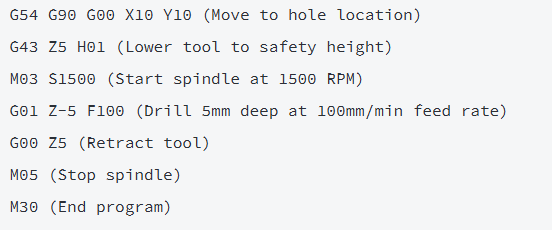
- G00: Rapid positioning (moves the tool quickly to a new location without cutting).
- G01: Linear interpolation (cuts a straight line at a specified feed rate).
- G02: Circular interpolation (cuts a clockwise arc).
- G54: Selects a workpiece coordinate system (tells the machine where the part is located).
M-codes (or “miscellaneous codes”) control non-cutting functions, such as machine setup and safety features. Examples include:
Unlike G-codes, some M-codes are machine-specific, so CNC programmers must reference the machine’s manual to ensure compatibility.
- M03: Starts the spindle (tool holder) rotating clockwise.
- M08: Turns on the coolant (to prevent tool overheating).
- M30: Ends the program and resets the machine to its starting position.
In CNC programming, G-codes and M-codes work together to create a complete sequence. For example, a simple CNC program to drill a hole might look like this:
Workpiece Setup Parameters
Before writing a CNC program, the programmer must define workpiece setup parameters—details about the part, material, and machine setup that ensure the code is accurate. These parameters include:
- Workpiece Coordinate System (WCS): This tells the CNC machine where the part is located relative to the machine’s origin (0,0,0 point). Programmers use G-codes like G54-G59 to set the WCS, often using a probe or edge finder to calibrate the part’s position.
- Material Properties: Different materials (e.g., aluminum, stainless steel, plastic) require different cutting speeds and feed rates. For example, steel is harder than aluminum, so it needs a slower feed rate to prevent tool wear. CNC programmers must adjust these parameters in the program to avoid damaging the tool or the part.
- Tool Selection: The type of tool (e.g., end mill, drill bit, lathe tool) and its dimensions (e.g., diameter, length) must be specified in the CNC program. This ensures the machine knows how much material to remove and how to move the tool without collisions.
Incorrect setup parameters are one of the most common causes of CNC machining errors. For example, if the WCS is set incorrectly, the tool might cut outside the part, ruining it. This is why CNC programming requires meticulous attention to detail.
Toolpath Optimization
Toolpath optimization is the process of refining the path the tool takes to minimize time, reduce tool wear, and improve part quality. It’s a critical step in CNC programming, as a poorly optimized toolpath can increase production time by 20% or more and shorten tool life.
Key strategies for toolpath optimization in CNC programming include:
- Minimizing Air Cuts: Air cuts (when the tool moves without cutting material) waste time. Programmers use CAM software to eliminate unnecessary air cuts by optimizing the tool’s path.
- Using Climb Milling: Climb milling (where the tool cuts in the same direction as the workpiece’s rotation) reduces tool vibration and produces a smoother surface finish. CNC programmers often prioritize this technique for high-precision parts.
- Z-Level Cutting: For deep cuts, programmers split the cut into multiple shallow passes instead of one deep pass. This reduces tool stress and prevents overheating.
Modern CAM software (like Autodesk Fusion 360 or Mastercam) automates much of the toolpath optimization process, but CNC programmers still need to review and adjust the path to ensure it’s efficient and safe.
Key Languages and Software for CNC Programming
While G-codes and M-codes are the foundation of CNC programming, modern CNC programmers rely on a range of languages and software tools to simplify and enhance the process. These tools have made CNC programming more accessible and powerful, especially for complex parts.
G-Code: The Universal Language
As mentioned earlier, G-code is the most widely used language in CNC programming. It’s often called the “universal language” of CNC machines because it’s standardized across most equipment. G-code can be written manually (for simple parts) or generated automatically by CAM software (for complex parts).
Manual G-code programming is still used for simple tasks, such as drilling a few holes or cutting a straight line. It requires a deep understanding of G-codes and M-codes, as well as the machine’s capabilities. For example, a programmer might write a manual G-code program for a 3-axis mill to cut a rectangular bracket.
CAM Software: Automating Complex CNC Programming
For complex parts (e.g., 3D components, 5-axis machining), manual G-code programming is impractical—it would take hours or days to write the code, and the risk of errors is high. This is where CAM (Computer-Aided Manufacturing) software comes in.
CAM software integrates with CAD (Computer-Aided Design) software to automatically generate CNC code from 2D or 3D design files. Here’s how it works:
- The designer creates a 3D model of the part in CAD software (e.g., SolidWorks, AutoCAD).
- The model is imported into CAM software (e.g., Fusion 360, Mastercam).
- The CNC programmer sets parameters in the CAM software: tool selection, material type, cutting speeds, feed rates, and toolpath strategy.
- The CAM software generates the G-code and M-code program, which is then loaded into the CNC machine.
CAM software has revolutionized CNC programming by:
- Reducing programming time (a complex part that would take 8 hours to program manually can be done in 30 minutes with CAM).
- Minimizing errors (CAM software checks for tool collisions and invalid toolpaths).
- Enabling advanced techniques (e.g., 5-axis machining, 3D contouring).
Popular CAM software tools for CNC programming include:
- Autodesk Fusion 360: A cloud-based tool that combines CAD, CAM, and simulation—ideal for small to medium-sized businesses.
- Mastercam: A industry-leading tool used in aerospace, automotive, and medical manufacturing—known for its advanced 5-axis capabilities.
- GibbsCAM: Specialized for CNC turning and milling, with features tailored to high-volume production.
Specialized Languages for Advanced Applications
For highly specialized CNC machining tasks, additional languages are used alongside G-code. These include:
- APT (Automatically Programmed Tool): A high-level language used for complex 3D parts, such as turbine blades or aircraft wings. APT code is converted to G-code by a postprocessor (a tool that adapts the code to the specific CNC machine).
- HAL (Hardware Abstraction Layer): Used in open-source CNC systems (e.g., LinuxCNC) to interface the CNC program with the machine’s hardware.
- MACRO Programming: A scripting language used to automate repetitive tasks in CNC programming. For example, a macro can be written to drill multiple holes of the same size without rewriting the code each time.
Applications of CNC Programming Across Industries
CNC programming is not limited to one sector—it’s a versatile skill used in nearly every manufacturing industry. Its ability to produce precise, consistent parts has made it indispensable for creating everything from everyday items to life-saving equipment.
Aerospace: High-Tolerance Components
The aerospace industry demands parts with extreme precision—tolerances as tight as ±0.0005 inches (12.7 micrometers)—to ensure safety and performance. CNC programming is used to produce critical components like:
- Turbine blades (with complex 3D shapes that optimize airflow).
- Aircraft frames (made from lightweight materials like titanium).
- Engine components (such as fuel injectors and combustion chambers).
Companies like Airbus and Boeing rely on CNC programming to produce these parts. For example, a single turbine blade requires a CNC program that controls a 5-axis mill to carve the blade’s twisted surface, ensuring it meets aerodynamic standards. Without CNC programming, producing these parts at scale would be impossible.
Automotive: Mass-Produced Precision
The automotive industry is all about volume—producing thousands of identical parts quickly and cheaply. CNC programming enables this by:
- Automating the production of engine blocks, transmission parts, and brake components.
- Ensuring every part meets strict quality standards (e.g., ISO 9001).
- Reducing waste (since CNC machines produce fewer defective parts than manual machining).
For example, a car manufacturer might use a CNC program to mill engine cylinder heads. The program directs a 3-axis CNC mill to cut the head’s surface, drill oil passages, and create valve seats—all in a matter of minutes. With CNC programming, the manufacturer can produce hundreds of cylinder heads per day, each identical to the last.
Medical: Customized Implants and Tools
The medical industry requires highly customized parts, such as artificial joints, dental implants, and surgical instruments. CNC programming makes this customization possible by:
- Using 3D scans (e.g., CT or MRI data) to create patient-specific designs.
- Generating CNC code that directs machines to mill implants from biocompatible materials (e.g., titanium or ceramic).
- Ensuring implants fit perfectly (a critical factor for patient comfort and recovery).
For example, a dental lab might use CNC programming to create a custom crown. The lab starts with a 3D scan of the patient’s tooth, imports the scan into CAM software, and generates a CNC program that mills the crown from a block of ceramic. The result is a crown that matches the patient’s tooth shape exactly—something traditional machining could not achieve.
Electronics: Miniaturized Components
The electronics industry relies on tiny, precise parts—such as smartphone circuit boards, laptop hinges, and sensor housings. CNC programming is used to produce these parts by:
- Controlling micro-tools (as small as 0.1mm in diameter) to cut intricate features.
- Ensuring parts are small enough to fit in compact devices (e.g., smartphones).
- Maintaining tight tolerances to ensure electrical components work correctly.
For example, a manufacturer might use CNC programming to produce a circuit board holder for a laptop. The program directs a CNC mill to cut small slots and holes in a plastic block, ensuring the circuit board fits securely and connects to other components properly.
FAQ
1.Do I need prior machining experience to learn CNC programming?
While prior machining experience helps (it builds understanding of tool behavior and material properties), it’s not mandatory. Many beginners start with CAD/CAM software tutorials (e.g., Fusion 360’s free courses) and basic CNC programming classes that teach G-codes and machine logic. Hands-on practice with simulators (like CNC Simulator Pro) or entry-level machines (e.g., Haas Mini Mill) further reinforces skills.
2.How long does it take to master CNC programming?
The timeline depends on your goals:
- Basics: You can learn to write simple G-code programs (e.g., drilling holes, cutting straight lines) in 2-3 months with 10-15 hours of weekly practice.
- Intermediate: Mastering CAM software and 3-axis machining takes 6-12 months.
- Advanced: Becoming proficient in 5-axis machining, toolpath optimization, and industry-specific applications (e.g., aerospace) may take 1-2 years of real-world experience.
3.What software is essential for CNC programming?
For most beginners, start with:
- CAD Software: Autodesk Fusion 360 (free for students and startups) or SolidWorks (industry-standard).
- CAM Software: Fusion 360 (integrated CAD/CAM) or Mastercam (for advanced users).
- Code Editors: CNC Editor (for manual G-code writing) or Mach3 (for testing code).
Industry-specific roles may require additional tools (e.g., GibbsCAM for automotive, PowerMill for aerospace).
4.Can CNC programming handle 3D parts?
Yes—advanced CNC programming, paired with 3D CAD/CAM software, excels at 3D parts. For example:
- 3-axis CNC machines use CNC programming to cut 3D parts with flat bottoms (e.g., plastic enclosures).
- 5-axis CNC machines use CNC programming to move tools along five axes, enabling complex 3D shapes (e.g., turbine blades, dental crowns).
CAM software automatically generates the 3D toolpath, so programmers don’t need to write G-code manually for these parts.
5.Is CNC programming at risk of being replaced by automation or AI?
While AI and automated code generation (e.g., generative design in Fusion 360) are streamlining parts of CNC programming, human expertise remains irreplaceable. Here’s why:
- AI can generate basic toolpaths, but programmers are needed to optimize them for efficiency and safety (e.g., avoiding tool collisions).
- Programmers must adjust for material variations (e.g., a batch of steel that’s harder than expected).
- Industry standards (e.g., aerospace ISO 9001) require human oversight to ensure compliance.
Automation complements CNC programming, but it doesn’t replace the need for skilled programmers.
References
- Smith, J. (2024). CNC Programming: Principles and Practice (5th Edition). McGraw-Hill Education. This textbook covers G-code fundamentals, CAM software usage, and industry best practices, with real-world examples from aerospace and automotive manufacturing.
- Manufacturing Technology Insights. (2023). The Evolution of CNC Programming: Trends Shaping 2024–2028. Retrieved from https://www.manufacturingtechnologyinsights.com. This report analyzes how AI and 5-axis machining are transforming CNC programming, with data from leading manufacturers like Haas and Mazak.
- International Association of Machinists and Aerospace Workers (IAMAW). (2025). CNC Programming Standards: A Comprehensive Guide for Modern Manufacturers. IAMAW Press. This guide outlines global standards for CNC programming (e.g., ISO 6983) and includes case studies on improving precision in medical device production.
What is a G Code
Is it Hard to Learn CNC Machining
Related Article

Gears are the backbone of mechanical transmission systems, converting rotational motion and torque between shafts to power everything from household appliances to industrial machinery.
What are the 4 types of gears

CNC machines (Computer Numerical Control machines) have transformed manufacturing by delivering unmatched precision, repeatability, and efficiency across material types—from metals to plastics and composites.
Which Industries Mostly Use CNC Machines

CNC machining is celebrated for its precision and versatility in shaping metals, plastics, and composites—but its subtractive nature (removing material from a solid workpiece to create parts) raises a critical question: “Is CNC machining wasteful?” At first glance, the piles of metal shavings, plastic chips, and scrapped parts from CNC operations might suggest yes.
Is CNC machining wasteful
